
Electric Car Screen Protector: A Practical Pre-Purchase Checklist
2026-10-17

Could the electric car screen protector that looks right online still be the wrong fit for your vehicle? A similar product photo isn’t enough to confirm compatibility. Screen shape, model year and display layout all matter, and the wrong choice can leave parts of the screen uncovered or interfere with everyday use.
Before ordering, check the protector against your vehicle’s specific display, then consider how its finish may look in your usual driving conditions. This checklist covers fit, visibility and touchscreen use so you can make a considered choice based on more than appearance.
You’ll learn what vehicle and screen details to compare, how clear and matte finishes differ, and what to prepare before fitting a protector. Use these checks to resolve key questions before buying and approach installation carefully.
Key Takeaways
- Match the listing to your vehicle and display details, not just a similar-looking screen.
- Check the stated coverage and installation requirements before choosing an electric car screen protector.
- Compare clear and matte finishes with the lighting and reflections you encounter while driving.
- Follow the protector’s instructions and apply it gradually for a more controlled fit.
- Use the product description to check fitment and specifications before you buy.
Table of Contents
- Why an electric car screen protector needs a screen-specific check
- Use this checklist to shortlist an electric car screen protector
- Compare screen protector finishes for visibility and daily use
- Prepare for a careful screen protector installation
- Make a confident choice and find relevant EV accessories
Why an electric car screen protector needs a screen-specific check
A screen protector is a separate layer fitted directly over a vehicle display to help protect its surface during everyday use. It covers the screen itself. A dashboard cover sits over or around dashboard surfaces and isn’t a substitute for a display protector. Because the protector sits on the screen, its shape and coverage need to match the display, not just the vehicle’s interior.
EV displays vary in size, shape, position and layout. A vehicle may have a central infotainment screen, a separate driver display or additional displays. The screens can also differ between versions of the same vehicle. Choose an electric car screen protector for the specific display you want to cover, rather than relying on the vehicle badge alone.
Identify which screen you want to protect
Start by identifying the display in your cabin: the central screen, the display behind the steering wheel or another screen. Check your vehicle handbook or records for the model and version details, then compare them with the product listing. If your vehicle has more than one display, check each screen separately. A protector made for one may not fit another.
Some vehicles also use a head-up display, which projects information into the driver’s field of view rather than presenting it on a conventional screen surface. For background on head-up display technology in electric cars, see the overview of the technology. First identify the physical display you intend to protect, then focus your fit check on that screen.
Why fit matters beyond the vehicle name
A vehicle name is a useful starting point, but it doesn’t confirm fit. Model year, trim or display configuration can affect the screen in your car. Compare the product listing’s vehicle details and screen description with your own display. Look for a match to its shape, position and coverage instead of relying on a product image that looks similar.
Incorrect dimensions can leave part of the display exposed or bring the protector too close to the screen edges and surrounding trim. Check whether the listing describes coverage for the full visible screen or a defined area. This helps you understand what the protector is designed to cover before you order.
This screen-first approach is also the foundation of the parent guide, “EV Screen Protectors: How to Choose the Right Fit and Finish”. Use it to focus your selection on the display, then assess the product’s finish and installation details in the next steps.
Use this checklist to shortlist an electric car screen protector
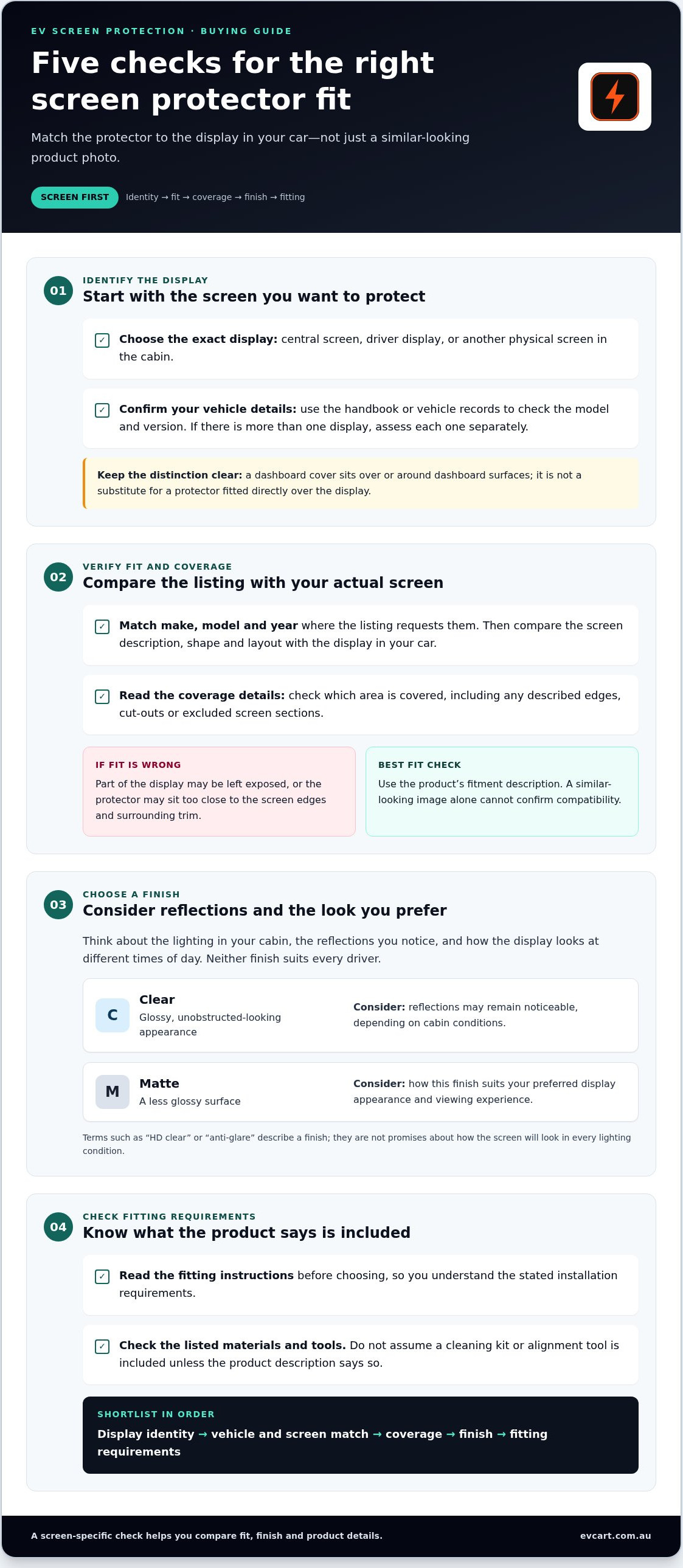
Work through these checks in order. They keep your decision focused on the actual display and product information, rather than a vehicle badge or photo that may not show the full fit.
- Screen identity: Confirm which display you’re protecting, such as the central screen or driver display. Use your vehicle handbook or records to identify the relevant configuration.
- Fit details: Match the listing to your vehicle’s make, model and, where requested, year. Compare its screen description with the display in your car.
- Coverage: Read which area the protector is designed to cover. Check for details about edges, cut-outs and excluded screen sections.
- Finish: Check whether the product is clear or matte, then consider which appearance and viewing experience you prefer.
- Installation requirements: Read the fitting instructions and check which materials or tools the product description says are included. Don’t assume a cleaning kit or alignment tool comes with it.
Check model, year and display layout
Start with the exact vehicle details requested in the listing, including the year if specified. Then compare the stated screen shape and layout with your display. A product image can help explain the design, but it can’t replace a fitment description. Use the separate screen protector compatibility guide for a step-by-step fitment check as you compare the listing with your vehicle.
Check coverage and product information
Coverage determines which parts of the screen the protector is designed to cover. Look for a clear description of the intended area, including any edges, cut-outs or separate display sections. If the listing doesn’t describe an accessory or installation tool as included, don’t count on it being in the package. This helps you compare products on practical details, not just appearance.
Keep the product description open while comparing it with your vehicle. If you’re missing a detail, review your vehicle information before deciding. For broader guidance on selecting practical additions for your car, the “EV accessories: A practical Australian buyer’s guide” covers choices beyond screen protection.
Once you’ve narrowed down the display, fit and coverage, compare the finish and installation requirements. Browse EV accessories at EV Cart Australia as part of your shortlist, and use each product description to assess its stated fitment and specifications.
Compare screen protector finishes for visibility and daily use
Finish affects how the display looks through the protector. Consider the lighting in your cabin, the reflections you notice and how the screen looks at different times of day. Your preferences may differ between driving in bright daylight and checking the display after dark. Neither finish is right for every driver.
A clear finish is generally intended to keep the display looking close to its original appearance, while a matte finish has a less glossy surface. Product descriptions may also use terms such as “HD clear” or “anti-glare”. Treat these as descriptions of the finish, not promises about how the screen will look in every lighting condition.
| Finish | Potential benefit | Trade-off to consider |
|---|---|---|
| Clear | May suit drivers who prefer a glossy, unobstructed-looking display. | Reflections may remain noticeable, depending on cabin lighting and viewing conditions. |
| Matte | May appeal to drivers who prefer a less glossy surface or want to consider an anti-glare-labelled option. | The surface can look different from a glossy screen, and the label doesn’t guarantee glare will disappear. |
Choose based on your viewing priorities, cabin lighting and tolerance for reflections. Neither finish is universally clearer or easier to use.
When a clear finish may suit your preferences
Consider a clear finish if you prefer a glossy, unobstructed-looking display. Check the product description to confirm which finish is supplied, especially if the listing offers several options. Don’t assume a clear protector is invisible or leaves every screen characteristic unchanged. Compare the stated finish with what matters to you.
When to consider a matte or anti-glare finish
Matte or anti-glare describes a viewing finish, not guaranteed glare removal. Think about the light and reflections you commonly notice in the cabin, then compare the product’s stated finish and images. Images can help show how a surface is presented, but they can’t reproduce your display, surroundings or viewing angle.
For a practical comparison, identify what matters most: a glossy appearance, reflections in particular conditions or a preference for a less shiny surface. Consider how the screen looks in the lighting you encounter regularly, rather than deciding from a product image alone. A finish can influence the viewing experience, but it can’t control every reflection or lighting condition.
Once you’ve chosen a finish, check that it matches the option named in the product description. Then review the installation requirements before ordering your electric car screen protector. Clear expectations make it easier to compare options without relying on broad claims.
Prepare for a careful screen protector installation
A tidy application starts before the protector touches the display. Dust, haste and poor alignment can affect the finished result, so set aside enough time to follow the instructions supplied with your protector. Designs and application methods vary. Don’t assume a process or tool that worked for another product will suit this one.
Use this sequence as a practical guide, while treating the product instructions as the authority for the specific protector you’re fitting:
- Read the instructions. Check the full application sequence and identify any supplied materials before you begin.
- Prepare the display. Clean and dry the screen as directed by the product instructions.
- Align carefully. Position the protector in line with the display before starting the application.
- Apply gradually. Follow the supplied method at a steady pace rather than pressing or forcing the protector into place.
- Check the result. Review the edges and screen operation in line with the product guidance.
Set up the screen before applying the protector
Choose a clean, well-lit place where you can see the display edges clearly. Read the instructions first, then prepare and dry the screen using the method specified for that product. Position and align the protector before you begin. Stopping mid-application to work out the next step can make careful placement harder.
Keep the work area organised, with any supplied materials within reach. Avoid opening or handling the protector until you’re ready to follow the application sequence. Preparation can’t remove every risk of dust or misalignment, but it helps you work with fewer interruptions and a clearer view of the screen.
Apply slowly and check the result
Follow the supplied sequence and let the protector settle into position as directed. Don’t force it towards an edge or make an adjustment the instructions don’t recommend. If the alignment looks wrong, pause and refer to the product guidance before continuing. A measured pace gives you more opportunity to notice placement issues as you work.
After application, inspect the edges and check the display responds as expected, following the product guidance. If you notice dust, trapped air or a misaligned edge, use only the corrective steps provided for that protector. Avoid improvising with tools or cleaning methods, which could affect the screen or protector.
Ongoing care is a separate step. Once the protector is fitted, follow the dedicated care guide for cleaning and maintenance rather than applying the installation instructions to routine screen care.
With the product instructions to hand, you can prepare the display and apply your electric car screen protector methodically. Explore EV accessories at EV Cart Australia as you shortlist options, and use each product’s stated fit and installation details to guide your choice.
Make a confident choice and find relevant EV accessories
A considered choice follows a clear order: identify the display, check the fit, compare finishes, then prepare for installation. Keep the product description alongside your vehicle details for the final check. Let the stated fitment and specifications guide your decision, not a familiar vehicle badge or a similar-looking screen.
Run through the final pre-purchase checklist
Before choosing an electric car screen protector, work through these points:
- Vehicle and screen: Do the product details match your vehicle and the specific display you intend to protect?
- Fit: Does the listing describe a screen shape or configuration that matches your display?
- Coverage: Is the intended screen area clear, including any stated edges, cut-outs or sections?
- Finish: Does the described finish suit your preferences for how the display looks in your cabin?
- Installation: Have you read the stated application requirements and noted what the listing says is supplied?
Pause if the product information leaves a fit question unanswered. Don’t guess from a product photo or assume a protector for a similar vehicle will match. Recheck the exact screen and listing details before deciding. This final pause can prevent a confident-looking choice based on appearance alone.
Explore accessories with your vehicle details in mind
Keep your make, model, year and screen information handy as you browse EV accessories. This makes it easier to compare product descriptions with your needs and set aside options that don’t clearly match. A shortlist based on clear information is more useful than a quick choice based on a product image.
Use the same careful approach for other accessories: read the listing, understand what it describes and assess whether it suits your vehicle. EV Cart Australia is an online destination for EV accessories, so browse with your vehicle details in mind and use the information provided for each item to guide your selection.
Once your checklist is complete, take a practical next step and Explore EV accessories at EV Cart Australia.
Make your next accessory choice with confidence
Choosing an electric car screen protector is a small decision with a daily impact. It sits between you and a display you use throughout your drive. Base your choice on your own habits and preferences, rather than buying quickly because a finish or product image looks appealing.
Treat the product description as practical information. Keep your expectations grounded in what it states. If an important detail doesn’t answer your question, pause rather than trying to infer fit or performance from a photograph. A considered purchase leaves you clear about what you’re ordering and how you plan to use it.
The same measured approach can help with other EV accessories. Browse at your own pace, focus on products that suit your vehicle and routine, and use the available descriptions to guide your decision. Explore EV accessories at EV Cart when you’re ready to take the next step.
Take the time to choose well, and you can move forward with confidence.
Frequently Asked Questions
Will an electric car screen protector affect touchscreen sensitivity?
A protector designed for a touchscreen may be intended to let you continue using on-screen controls, but the result depends on the particular product and display. Check the product description for any stated touchscreen compatibility, then test a few common controls after fitting, such as tapping a menu or adjusting climate settings while parked. If the response feels different, consult the protector’s instructions before attempting to reposition or remove it.
Can one screen protector fit every electric car?
No. Screen dimensions and layouts vary, so a protector made for one vehicle display may not line up with another, even if the cars share a brand or model name. For example, a central display and a driver display in the same cabin are separate surfaces with different shapes. Treat each screen as its own fitment and rely on the product’s stated vehicle and display compatibility.
How do I reduce bubbles when applying a screen protector?
Work slowly and keep the screen and protector clean, since dust or poor alignment can contribute to bubbles. Follow the supplied application sequence and use only the tools or correction method described for that product. Don’t press hard or lift an edge on impulse; either action could affect the application. If a bubble remains, check the instructions for that specific protector before trying to correct it.
Is a matte screen protector better than a clear one for an EV?
Neither finish is automatically better. The right choice depends on what you prefer to see from the driver’s seat. A matte option may suit someone who favours a less glossy surface, while clear may appeal to someone who prefers a glossy-looking display. Neither label guarantees a particular result in every lighting condition. Consider the cabin reflections you notice most and compare the finish stated in the product description.
Can I install a screen protector over a scratched display?
You may be able to apply one, but a protector won’t repair existing scratches. A scratch, chip or uneven area could remain visible beneath the new layer and may affect how it sits. Inspect the screen before installation and check the protector’s instructions for guidance on damaged displays. If the screen has a crack or raised damage, avoid pressing on it and follow the vehicle manufacturer’s guidance.
How can I tell whether a screen protector covers the whole display?
Check the product description for the intended coverage and look for a diagram or image showing the protector’s outline against the display. Compare that outline with the active screen area in your vehicle. A protector may be shaped around a cut-out or cover only a defined section, so read “full coverage” wording alongside any stated exclusions. Don’t use the package photo alone as proof of exact coverage.