
Car Key Case Compatibility: A Practical Fit Checklist for EV Owners
2026-10-20

Car key case compatibility depends on the exact key fob in your hand, not just the badge on your car. Two keys for the same EV can differ by model year, generation, shape or button layout, so a case labelled for your vehicle may still be the wrong fit.
Product listings can be difficult to assess when they show only a vehicle name or a few photos. A case that looks close may sit awkwardly, leave parts exposed or make buttons harder to press. Compare the fob itself with the case details before you choose.
This guide gives you a practical checklist. Identify your fob using the vehicle details and its physical design, then compare its outline, dimensions, buttons and openings with the case listing. You’ll also learn how to handle missing or conflicting details, so you can avoid relying on a guess.
Key Takeaways
- Use the exact physical fob, not just the vehicle badge, to assess car key case compatibility.
- Inspect both sides of your fob in good light and note its shape, button layout and visible openings.
- Compare the fob with the case’s stated fitment and product images, including key-ring, blade or port cut-outs.
- Use the same comparison steps for every case listing to make a more informed choice.
- If the listing and fob details don’t clearly match, treat compatibility as unresolved rather than assuming the case will fit.
Table of Contents
- Car key case compatibility: why the exact key fob matters
- Identify your key fob: the details to check before choosing a case
- Compare a case with your fob: fitment details that can reveal a mismatch
- Car key case compatibility checklist: complete these checks before ordering
- After checking compatibility: choose your next step with confidence
Car key case compatibility: why the exact key fob matters
Car key case compatibility means matching a protective case to the exact physical key fob it is designed to fit. The case should follow the fob’s shape and dimensions, with openings that align with its buttons and other features. A vehicle badge alone can’t confirm a match.
A protective case fits around your existing fob. It is different from a replacement shell, which takes the place of the fob’s outer housing, and from a complete remote, which is a separate key unit. Listings may use terms such as “case”, “cover” and “shell” differently, so check what the item is and what the listing says it fits. Don’t assume a protective cover will replace a damaged housing or provide another working remote.
What does car key case compatibility mean?
Start with the fob’s outline. A case made for a fob with a narrow neck, rounded corners or a raised section may not sit properly on one with a different profile, even if both have a similar number of buttons.
Next, compare the dimensions and details that need to stay accessible. Button positions and openings must line up, including any key-ring opening or visible cut-out. A close visual resemblance isn’t enough if the case covers a button or leaves part of the key exposed. Compare the listing’s fitment details and images rather than assuming the case will stretch or adjust to suit a different design.
Some fobs use smart-key functions, which let the key communicate with the vehicle without being inserted into a conventional lock. For background on how these keys work, see Smart key technology. The technology doesn’t change the basic fit check: the case still needs to match the physical fob.
Why vehicle make and model may not be enough
A vehicle name can cover different trims, production years or key versions. The fobs may look similar at first glance but have a different outline, button arrangement or cut-outs. A model name can narrow your search, but it doesn’t prove that a case will fit the key you own.
Use the vehicle details as a starting point, then identify the fob in your hand. Check both sides and note its shape, button count, button arrangement and visible openings. Compare those features with the listing’s fitment information. If a listing names a particular GAC Aion model or model year, as an Amazon listing may do, treat that label as a useful clue, not a substitute for matching the pictured or described fob to yours.
This distinction matters when a listing gives only a broad vehicle label or an unclear image. If you can’t match the shape, buttons and openings with the stated case fitment, compatibility remains uncertain. Keep the vehicle information and fob details together, then compare them directly with the case before choosing.
Identify your key fob: the details to check before choosing a case
Before comparing case listings, make a clear record of the fob you actually use. Inspect both sides in good light and note the details that distinguish it from similar versions. This gives you a practical reference for checking product descriptions and photos instead of relying on memory or the vehicle badge.
Record the fob’s outline, thickness, button count and layout, visible openings, key blade and vehicle version before comparing cases.
Record the fob shape, buttons and openings
Look at the fob from the front, back and side. Note whether its outline is long or compact and whether its edges are rounded or squared. Check its thickness too. A side view can reveal a raised section or taper that isn’t obvious from the front.
Count the buttons and note their symbols, spacing and positions. For example, record whether the lock and unlock buttons sit side by side or one above the other, and whether another button sits separately near the edge. Button count alone isn’t enough: two fobs can have the same number of buttons arranged differently.
Inspect the edges and both faces for openings or exposed features. Record the key-ring opening, any visible charging point, if present, and any cut-out or exposed section for a key blade. If the fob has a physical blade, note where it sits and whether it folds, slides or remains exposed. This can help distinguish versions with otherwise similar shapes.
- Shape: overall outline, thickness and edge profile.
- Buttons: count, symbols, spacing and relative positions.
- Openings: key-ring position and any visible port or blade cut-out.
- Blade: whether it’s present and how it sits in the fob.
Check the vehicle and key version
Write down the vehicle make, model, production year and variant, if known. Then compare your fob with a clear reference photo in the owner’s manual or vehicle materials. Check the actual shape and button details against the reference. Don’t assume the pictured key is identical just because the model name matches.
Trim and production changes can mean one vehicle name covers more than one fob design. Your notes help you distinguish between those possibilities. If the manual shows a different button arrangement or blade position, record what you see on your own key rather than treating the reference as definitive.
Keep the vehicle details and fob notes together as your fitment reference. When reviewing EV accessories at EV Cart, compare the specific key details with each case listing before deciding whether the match is clear.
Compare a case with your fob: fitment details that can reveal a mismatch
Put your fob notes beside the case listing and compare one feature at a time. This makes car key case compatibility easier to judge than relying on a product title or a quick glance at a photo. Assess the written fitment and images separately, then check that both support the same match.
Match the case openings to the key’s controls
Check that each button lines up with an opening or a usable cover area. Compare the spacing and position, not just the number of buttons. Then check the key-ring opening and any cut-out for a blade or visible port. A case can have a similar outline but still block a control or put an opening in the wrong place.
Use this simple two-column check:
Your fob: outline, button positions, key-ring opening, blade or port details.
Case listing: stated fob shape or version, button layout, and matching openings or cut-outs.
Mark each detail as a match, a mismatch or not shown. If a product photo seems to line up but the written fitment describes a different key version, don’t treat the photo as proof. The reverse is also true: a compatible-sounding title isn’t enough if the images show a different layout.
Read compatibility wording carefully
Look for fitment wording that identifies the vehicle model, year or key version. A listing that names the exact version gives you more to compare than a broad phrase such as “fits many models”. That phrase alone doesn’t tell you which fob shapes, button layouts or openings the case is designed for.
Read the full product information, including compatibility notes beneath the title. Check whether the wording refers to the vehicle or the physical key. Those aren’t interchangeable: a vehicle name may cover more than one key design. If the listing names several models, compare its stated details with your fob rather than assuming every version is included.
Don’t infer the case material, level of protection or precise fit from photographs alone. Images can help you compare visible features, but may not show dimensions, thickness or the fob version the case is intended for. Use photos to spot potential differences, then look for written fitment details that support your comparison.
If a key detail is unclear, record it as unresolved rather than guessing. Apply the same checks to EV Cart’s EV accessories before choosing a case, and look for agreement between your fob and the listing details.
Car key case compatibility checklist: complete these checks before ordering
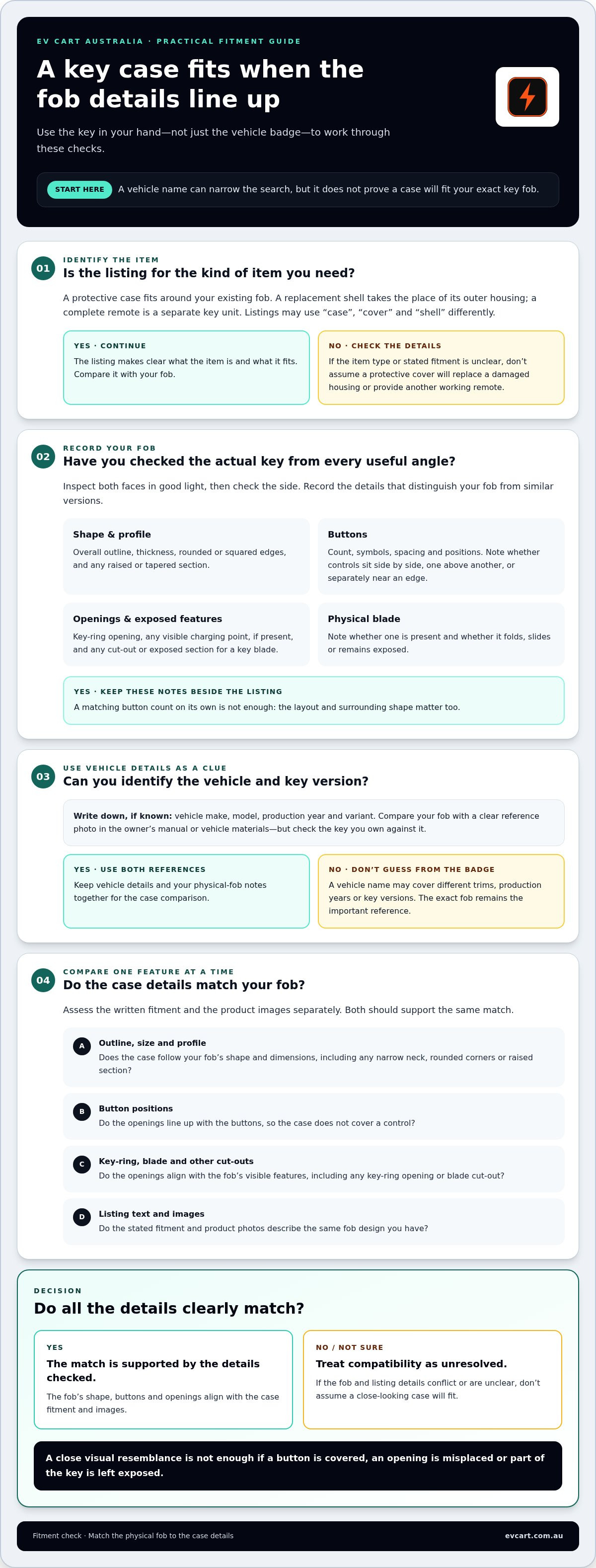
Use this five-point check before selecting a key case. Start with the physical fob, then compare its details with the listing’s fitment information and product images. This keeps a familiar vehicle name from standing in for a proper fit check.
For car key case compatibility, identify the exact fob, compare its shape and controls with the listing, confirm the key version, then pause if any detail conflicts or remains unclear.
Use this five-point fitment checklist
- Record the vehicle details. Note the make, model, production year and variant where known. Use these as references, not as proof that a particular case will fit.
- Inspect the exact fob in your hand. Check both sides in good light. Note its outline, thickness, button layout and any key-ring opening, blade or visible port.
- Compare the physical features. Match the fob’s shape and button positions against the listing’s written description and product images. Check that cut-outs align with the key-ring opening, blade or other visible features.
- Read the stated fitment. Look for wording that names the relevant model, year or key version. Check whether the listing describes the physical fob instead of relying only on the vehicle name.
- Review the images against the details. Use photos to spot differences in outline and openings, but don’t treat visual resemblance as confirmation on its own. The images and written fitment should support the same match.
Keep your notes beside the listing while you work through each point. A simple “matches”, “differs” or “not shown” record makes it easier to see whether you have a clear fitment match or an unanswered question.
What to do when details do not line up
Pause before ordering if the button positions, outline or openings don’t match, or if the listing uses broad wording without identifying the key version. Don’t assume a near-match will stretch, adjust or leave every control accessible.
Compare your fob with another clear reference, such as the relevant information in the vehicle’s owner’s manual. Confirm that you’re looking at the right vehicle year and version, then review each physical detail against the product information again. If the listing still doesn’t resolve the difference, treat compatibility as uncertain rather than guessing.
When your checklist points to a clear match, browse EV Cart’s EV accessories with your vehicle and fob notes ready. Choose a case only when the listing details support the key you own.
After checking compatibility: choose your next step with confidence
A protective case is a suitable option only when the physical fob and listing point to the same fit. If the outline, controls, openings and stated key version line up, you have a stronger basis for choosing. If an important detail conflicts or is missing, pause and treat the match as unresolved. A familiar vehicle name or similar-looking photo can’t settle that gap.
A confident match means the fob’s features agree with the product information, not simply that the case looks close. If you can’t establish that agreement, revisit your reference material or set that option aside until you can identify the fob more precisely. There’s no need to guess.
Keep a record of your key details
Save your vehicle’s make, model, year and variant where known, alongside a clear reference image of the fob. Add a short note describing its shape, button count and layout, and any distinctive openings. This gives you a consistent comparison point if you look at other listings later or replace your fob.
Make sure your reference image shows both sides and the relevant edges. Avoid relying on a photo that hides the buttons or an opening you need to compare. Your written notes should describe what the fob actually shows, not what you expect a key for that vehicle to look like.
Use the same record each time you assess a case. It can help you spot when a new listing describes a different key version, even if it uses a familiar vehicle name. Your notes also make it easier to revisit a decision without starting the identification process again.
Explore related EV accessory guidance
For a broader approach to choosing a protective cover, continue with the related guide, EV Key Case: How to Choose the Right Fit. For context beyond key cases, EV accessories: A practical Australian buyer’s guide can help you consider how accessories fit into everyday EV ownership.
Keep the central rule in mind: identify the exact fob first, then choose a case only when its physical details and the listing information agree. If the comparison remains uncertain, hold off rather than relying on a near-match. When you’re ready to explore accessories, browse EV Cart’s Australian EV accessories and use your saved fob details to guide your selection.
Make your next accessory choice with confidence
Make compatibility checks part of your ownership routine. Keep the vehicle and fob details with your vehicle records, then revisit them if the key is replaced or you change vehicles. A new fob can look familiar while having different physical details, so treat each key as its own reference rather than carrying assumptions over from an older one.
This simple check keeps car key case compatibility tied to the key you actually use. Choose a case when the listing and physical fob align; if they don’t, wait until you can make a clear comparison. Once fit is established, consider which style and everyday features suit your preferences. A careful decision is more useful than choosing quickly and discovering a mismatch later.
When you’re ready to explore EV accessories, browse EV Cart Australia and use your fob details to guide your next choice.
Frequently Asked Questions
Can a car key case fit more than one vehicle model?
Sometimes, but a multi-model title can refer to one shared fob design rather than every key supplied with those vehicles. For car key case compatibility, check whether the listing identifies a particular fob or gives selectable versions. If it names several vehicles without explaining the scope, don’t assume every vehicle’s key is covered. Treat the wording as a claim to assess, not proof that all variants use the same design.
How do I find the model or version of my car key fob?
Start with your vehicle documents and owner’s manual, then consider whether the fob has been replaced. A replacement key may differ from the one originally supplied, so the vehicle details alone might not identify the fob in your hand. If you have paperwork from a key replacement, keep it with your vehicle records. It can help you distinguish the current key from an earlier version without relying on memory.
Is a key case the same as a replacement key shell?
No. A protective case is an accessory for your existing fob, while a replacement shell is intended to replace its outer housing. Before buying, check what the listing says is supplied. A shell listing doesn’t necessarily mean it includes the electronics, blade or other parts of a complete key. This guide covers choosing a protective case, not replacing or transferring key components.
Can a case cover make my key fob buttons harder to use?
It can. A cover may change how the buttons feel under your fingers, even when its control areas appear to line up. After fitting a case, press each control gently and check that it responds as expected. Don’t force a button that feels stuck or unusually difficult to press. Remove the cover if it interferes with normal operation, and follow any care or fitting directions supplied with the product.
What should I check if my key fob looks different from the product photos?
Check whether the listing has options or image captions that distinguish one fob version from another. A product page may show a general example while the selected option refers to a particular design. Look for a photo of the back or side if those views clarify the difference. If the images don’t identify the version shown, don’t rely on resemblance alone to decide that the case is suitable.
Do key cases need to be compatible with the key blade as well as the buttons?
Yes, if your fob has a physical blade, consider how you’ll access and use it with the case fitted. An opening may provide clearance, but that doesn’t mean a blade comes with the case. Check the product description for what the accessory includes, and make sure the case doesn’t obstruct the blade’s movement. Avoid forcing a folding or removable blade against the cover.
Will the same car key case fit every year of the same model?
Not necessarily. A vehicle’s build year and the year it was first registered can differ, so check which year the listing uses when it specifies a range. Vehicle documents may help you identify the relevant build details. If your key has been replaced, its version may not match the vehicle’s original production year. Base your decision on the current fob and the listing’s stated scope.