
EV Charger Cable Holder Options Compared for Your Wall
2026-10-25

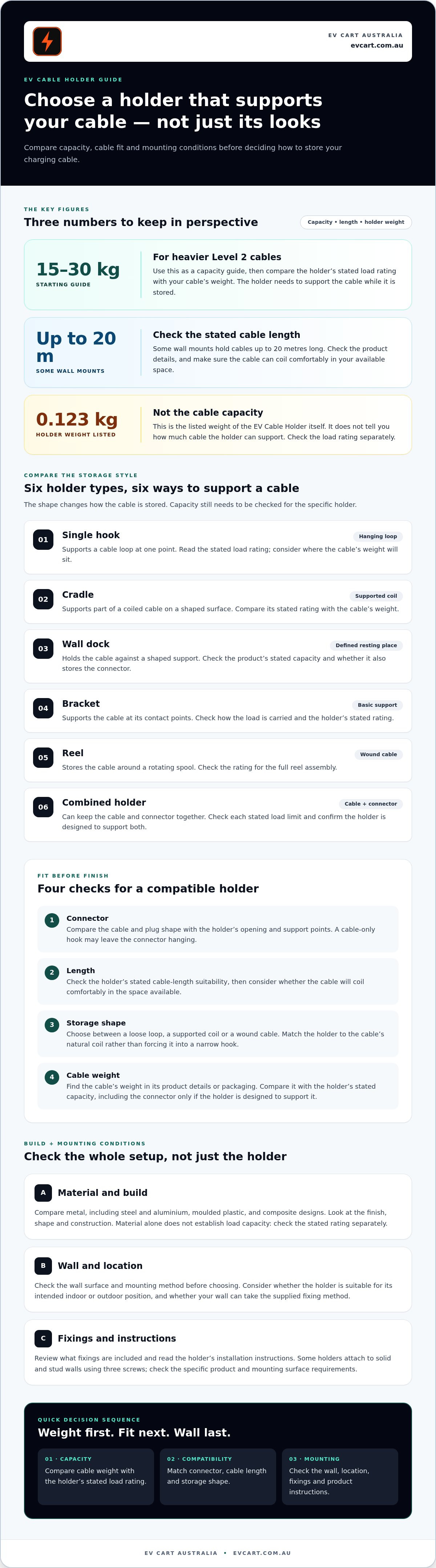
The neatest-looking mount may be the wrong choice if it can’t support your cable. For heavier Level 2 charging cables, choose an ev charger cable holder rated for at least 15-30 kg, then match its shape and fit to your cable and wall. Capacity matters, but so do mounting conditions and the fixings supplied.
A charging cable is easier to manage when its holder suits the cable you use. Choosing by appearance alone can leave you with a poor fit or a mount that doesn’t suit your wall.
This guide explains how to compare holder capacity, cable compatibility, materials, mounting conditions and fixings. It also outlines how common holder styles differ, helping you choose a practical option for your setup.
Key Takeaways
- For heavier Level 2 charging cables, compare mounts rated for at least 15-30 kg and allow for the cable’s weight when coiled.
- Match the holder’s design to your cable’s connector type, length and coil shape; some wall mounts accommodate cables up to 20 metres long.
- Compare the holder’s material and build for a sturdy fit and suitability for its intended indoor or outdoor position.
- Check the wall surface and mounting method before choosing. Some holders attach to solid and stud walls using three screws.
- Review the included fixings and the installation instructions so you know what the holder supplies and what the mounting surface requires.
Table of Contents
Cable weight capacity
Start with the cable’s weight, not the holder’s appearance. For heavier Level 2 charging cables, choose a mount rated for at least 15-30 kilograms. Treat that as a capacity guide, then compare the stated rating with your cable’s weight. A holder must support the cable while it’s stored, not just look suitable on the wall.
An EV charger cable holder supports a cable in different ways. A hook holds a loop at one point, while a cradle or dock supports the coil over a wider area. A reel stores the cable on a spool. These designs don’t necessarily have the same load rating, so check the stated capacity for the specific holder.
| Holder option | Load support | Capacity check | Useful for |
|---|---|---|---|
| Single hook | Supports a cable loop | Read the stated load rating | A simple hanging arrangement |
| Cradle | Supports part of a coiled cable | Compare rating with cable weight | A cable stored in a loose coil |
| Wall dock | Holds cable against a shaped support | Check the product’s capacity details | A defined storage position |
| Bracket | Supports cable at its contact points | Check how the load is carried | A basic wall-mounted support |
| Reel | Stores cable around a rotating spool | Check the rating for the full assembly | A cable wound onto a reel |
| Combined holder | Supports cable and connector | Check each stated load limit | Keeping both parts together |
Don’t assume a holder’s capacity based on its material or size. A broad dock still needs a stated load rating, and a sturdy-looking hook may concentrate the cable’s weight at one point. Compare the holder’s capacity with the cable you plan to store, including its connector if the design supports it.
Use these steps before choosing:
- Find the cable’s weight in its product details or on its packaging.
- Identify whether the holder supports the cable, connector, or both.
- Compare the holder’s stated capacity with the cable’s weight.
- For a heavier Level 2 cable, use the 15-30 kilogram guide as your starting point.
Weight also affects how a cable sits in its holder. A tightly wound coil can pull differently from a loose loop, particularly if the connector hangs from the cable. Choose a design that supports the cable’s natural coil rather than forcing a heavy cable into a narrow hook. Support the connector only if the holder is designed to carry it.
Check the holder’s stated capacity first, then choose a support shape that suits how your cable sits when stored.
The EV Cable Holder is listed as weighing 0.123 kg. That figure describes the holder itself, not its cable weight capacity, so check the stated load rating separately before storing a cable. Keep these measurements distinct when comparing options: the holder’s listed weight is not a substitute for information about the load it can support. If a capacity is not stated, seek product details rather than estimating it from the holder’s weight.
Choosing a compatible cable holder
Australian buyers can choose from hooks, cradles, wall docks, brackets and reels. Match the holder to your cable’s connector, length and preferred storage position.
Cable compatibility
A compatible holder supports the cable securely without forcing the connector or coil into an unsuitable shape. Identify the connector type, then compare the holder’s opening and support shape with your cable and plug. A holder designed for a narrow loop may not suit a bulky connector stored alongside it.
Next, consider cable length. Some wall mounts hold cables up to 20 m long, but the cable still needs to coil comfortably in your available space. Check whether the product description covers cable length, connector storage or both. Don’t assume a holder supports the connector just because it holds the cable.
Available holder types
Hooks provide a hanging point, while cradles support a cable loop on a shaped surface. Wall docks offer a defined resting place, and brackets provide a simple support point. Reels wind the cable onto a spool, changing how it is stored and retrieved.
These options differ in how they store the cable, not just in appearance. A hook leaves the cable hanging; a dock or cradle supports a coil. A reel requires the cable to wind onto a spool. Choose a style that suits your cable’s natural coil and the space beside your charger.
Use this comparison before choosing:
- Connector: Check the cable and plug shape against the holder’s support points.
- Length: Compare the cable length with the holder’s stated capacity.
- Storage: Decide whether you want a loose loop, a supported coil or a wound cable.
- Space: Consider where the connector and cable will sit when stored.
For a Type 2 cable, inspect how the holder supports the plug as well as the cable loop. A separate connector rest can keep the plug in a dedicated position, while a cable-only hook may leave it hanging. Choose based on the storage arrangement you need, rather than assuming every mount handles both parts.
Compare your cable’s length and connector with the holder’s stated use, then picture how the cable will sit after charging. This practical check helps you choose a storage style that suits both your cable and the space beside your charger.
Holder materials and build quality
Material affects how a wall mount handles its surroundings and daily use. Compare metal, moulded plastic and composite designs by their finish, shape and construction. Material alone doesn’t establish how much weight a holder can support. Check its stated capacity separately, then consider whether the complete design suits your cable and mounting location.
Metal holders, including steel and aluminium designs, can provide rigid support. Check the edges, bends and finish for rough spots that could catch the cable jacket. For outdoor use, consider whether the coating or surface finish suits exposure to rain and coastal air. Not every metal finish is equally suited to these conditions.
Moulded plastic holders often have rounded edges and shaped cable rests. Check for clean moulding, even thickness and a secure attachment point. For an outdoor wall, look for product information describing the holder’s intended exposure to sun and weather. Colour and gloss alone don’t show how the material will hold up.
Composite holders combine materials or use a shaped body with separate fixings. Inspect where the cable touches the holder and where the holder meets the wall. These contact points matter: a sharp edge can rub the cable, while a flexible body may move under load. Assess the finished design rather than relying on a product photo alone.
- Surface: Look for smooth, rounded cable contact areas.
- Body: Check for visible cracks, uneven moulding or loose components.
- Finish: Match the stated material and coating to the intended location.
- Fixing points: Inspect their position and construction against the holder’s design.
- Contact: Picture the cable resting on the holder without sharp bends or rubbing.
Build quality also depends on how the parts join. A metal hook attached to a separate base has a joint to inspect, while a one-piece moulded holder has no separate hook connection. Look for clear product images and descriptions of the body, finish and included parts. Don’t infer load capacity from a thick edge or heavy appearance.
Before buying, compare the material description, holder shape and cable-contact area, then check the capacity rating and mounting details. A smooth indoor finish may suit a garage wall; for an exposed wall, prioritise the maker’s stated environmental suitability. These checks help you assess the holder’s finish and construction, not just its appearance.
Clean the holder according to care instructions for its material. Avoid rough tools that could scratch a coating or damage a plastic edge. During routine use, check visible joints and contact surfaces, especially if the holder shifts or shows wear. The material, finish and construction should suit its location.
Indoor and outdoor mounting considerations
Wall-mounted holders attach to a surface, while freestanding holders stand independently. Positioned thoughtfully, both can keep a charging cable out of walking paths.
Wall-mounted holders
A wall-mounted holder attaches directly to a suitable wall, keeping the cable near its storage point. Top Charger’s EV cable wall mount attaches to solid and stud walls using three screws. This fixed position can suit a garage or sheltered exterior wall where the cable reaches the vehicle without crossing a doorway.
Choose a location that suits the cable route and wall surface. Outdoors, consider exposure to rain, direct sun and wind. A sheltered wall can reduce exposure, while an uncovered wall leaves the holder open to the weather. Keep the cable clear of doors and regular foot traffic.
Freestanding holders
A freestanding holder stands on its own instead of attaching to a wall. It can suit a space without a practical mounting surface or where storage needs to move with the charging setup. It can be repositioned, unlike a fixed wall mount, but it takes up floor space.
Consider the base and surrounding surface before placing a freestanding holder in a garage or driveway. On an uneven or busy surface, it may shift or obstruct movement. Placing it beside a vehicle bay keeps it closer to the cable route, but make sure it doesn’t block a walkway or vehicle access.
Trip hazard prevention
A holder can help reduce trip hazards by lifting stored cable off the ground and giving it a designated place. A wall dock near the charger keeps a coiled cable beside the wall instead of stretched across a garage path. A freestanding holder can serve the same purpose where a wall mount isn’t suitable.
Position the holder so the cable reaches the vehicle without crossing a doorway or walking route. After charging, return the cable to its support instead of leaving a loop on the floor. Check the route from charger to vehicle, including the path people use to enter or leave the garage.
Cable damage prevention
Storing a cable on a holder can keep it away from tyres, shoes and garage clutter. A wall-mounted dock keeps the cable clear of floor-level obstacles. A freestanding holder can also separate the cable from these hazards, provided it stays clear of vehicle and foot traffic.
Use the holder as designed: support the cable without forcing a tight bend or trapping it against a door. Rest the connector in its designated place if the holder has one. Check the cable’s contact points during routine use. Move the holder if the cable rubs against a sharp corner, gets pinched or lies across a regular path.
Installation and included fixings
Mounting a cable holder means securing a storage accessory to a surface, not connecting it to charger wiring. Choose fixings suited to the wall and follow the holder’s instructions.
Holder installation
Start by identifying the wall material, such as masonry, timber or plasterboard. Compare it with the holder’s installation instructions. A fixing suited to solid masonry may not grip a hollow wall or timber in the same way, so match the method to the surface.
Position the holder where the cable reaches the vehicle without crossing a doorway. Check that doors and vehicle movement won’t trap the cable. Mark the fixing points using the holder’s mounting holes or supplied template, then follow the product directions for drilling and securing it.
Included fixings
Fixings vary between holders. Check the product details and package contents to see whether screws, wall plugs or other mounting parts are supplied. A supplied screw may not suit every wall, so compare its intended use with your mounting surface before installation.
If the wall needs a different fixing, choose one suited to the surface and the holder’s mounting holes. Don’t use a fixing that cannot grip securely. Keep the parts together as you prepare, so you can compare the contents with the instructions before starting.
Use this preparation sequence:
- Read the holder’s instructions and identify its mounting points.
- Check the wall material at the planned position.
- Compare the supplied fixings with the wall and instructions.
- Mark the position and check the cable route before drilling.
- Secure the holder as directed, then check that it stays in place.
For a solid or stud wall, follow the fixing method specified for that surface. Plasterboard needs particular care because the board alone may not hold every fixing securely. Use the method specified for the holder and wall rather than assuming one type of screw suits every surface.
Australian requirements depend on the work involved. Attaching a standalone cable holder is accessory mounting; it doesn’t connect the holder to the charger’s electrical supply. Don’t alter charger wiring as part of this task. Keep cable storage separate from electrical work.
Before storing the cable, place it on the fitted holder and check that the mount remains steady. Keep the holder’s instructions for reference, especially if you later move it to another wall. A new surface may need a different fixing method, so reassess the material and mounting approach before reattaching it.
EV Cart Australia: EV accessories
EV Cart Australia offers EV accessories for everyday electric vehicle ownership. Explore its range when comparing ways to organise your charging setup or looking for useful additions alongside a cable holder. First, narrow down your needs, including cable fit, storage style and mounting location.
Note your cable’s connector and length, then consider whether a wall-mounted or freestanding holder suits your space. These details help you assess accessories against your setup, beyond appearance alone.
Browse EV Cart Australia’s EV accessories to explore options for your setup.
Make your charging space work for you
Before choosing a holder, picture your regular charging routine. Consider where you park, how you approach the vehicle and where the cable naturally rests after use. The holder should suit that routine, not just the wall or floor space available today. If your parking arrangement changes, reassess the cable route and storage position before moving it.
The right ev charger cable holder should make it straightforward to put the cable away. Keep your priorities clear as you compare options, and choose a design suited to the cable and its everyday surroundings. A considered fit can help keep your charging area organised without adding unnecessary complexity.
For EV accessories, visit EV Cart Australia. Take the next step with a clearer idea of what works for your setup, and make your charging space your own.
Frequently Asked Questions
Which cable holder fits a Type 2 EV charging cable?
Choose a holder shaped to support your Type 2 cable and connector without forcing either into place. Compare the holder’s opening and resting area with the plug’s size and the cable’s coil. For example, a cable-only hook may not provide a separate place for the connector. Product fit details and clear images can help you judge the arrangement before buying.
How do you install an EV charger cable holder?
Install the holder according to its instructions and the fixing method suited to your wall. Position it so the cable reaches the vehicle without crossing a walkway. Mark the fixing points, check what lies behind the surface, then attach the holder as directed. A storage mount doesn’t connect to charger wiring, so keep the task separate from electrical work.
Can an EV charging cable holder be installed outdoors, and is it weatherproof?
Install a holder outdoors only if it is intended for outdoor exposure. A sheltered spot doesn’t automatically make a product weatherproof. Check its environmental suitability and care instructions before choosing an exposed position. Consider the conditions at the wall, such as direct sun, rain or coastal air, and select a holder whose stated use covers the location.
What weight and cable length should an EV cable holder support?
For heavier Level 2 charging cables, use a holder rated for at least 15-30 kilograms. Match the rating to the actual cable and how it will rest on the mount. Cable length also affects storage: the Top Charger wall mount holds cables up to 20 metres long. Check the holder’s stated limit against your cable rather than assuming every long cable will coil comfortably.
Which EV cable holders are compatible with home chargers and public charging cables?
Compatibility depends on the cable and connector the holder must support, not simply whether you charge at home or in public. For a portable cable, compare its connector shape, cable thickness and storage arrangement with the holder. A cable attached to a public charging unit may not be yours to store elsewhere. Choose a mount for cables you control and need to organise.