
EV charging port cover prices and Tesla CCS cap fit
2026-10-24

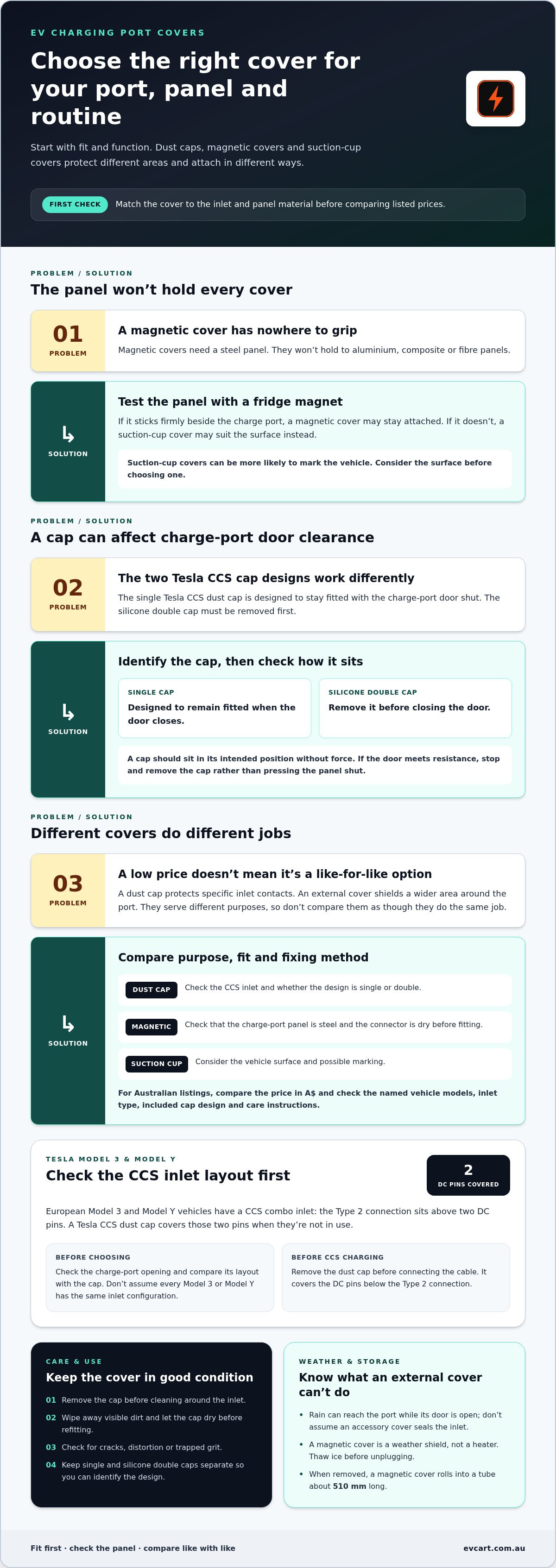
The right EV charging port cover depends on your vehicle and how you use its charging inlet. A single Tesla CCS dust cap allows the charge-port door to close while it is fitted; the silicone double cap must be removed first. Magnetic covers also need a steel panel to stay attached.
Choosing a cover is straightforward when you check the fit first. A cover that doesn’t suit your car’s panel material or charge-port design can be inconvenient, and Tesla CCS caps have specific fitment requirements.
This guide explains the main cover options, what affects their price, and how to choose a replacement for a broken or missing cover. It also covers whether you can close the charge-port door with a dust cap in place, how to check if a magnetic cover will hold, and what Tesla Model 3 and Model Y owners should know about CCS caps.
Key Takeaways
- Choose between magnetic and suction-cup covers based on the material around your vehicle’s charge port.
- Check whether a magnet sticks firmly to the panel before choosing a magnetic cover.
- Know which Tesla CCS dust caps let the charge-port door close and which need to be removed first.
- Match a replacement cap to your vehicle’s inlet and charging setup rather than assuming covers are universal.
- Compare cover styles and product options to find a practical fit for your charging routine.
Table of Contents
Closing the charge-port door with a dust cap fitted
Whether the charge-port door closes depends on the Tesla CCS dust cap design. A single Tesla CCS dust cap is designed to stay fitted with the door shut. Remove the silicone double Tesla CCS dust cap before closing the door. This distinction matters if you want to leave a cap in place between charging sessions.
Before shutting the door, check the cap’s shape and how it sits over the inlet. A single cap should sit in its intended position without force. If the door meets resistance, stop and remove the cap rather than pressing the panel shut. Remove a silicone double cap first, then close the door normally.
In Australia, follow the vehicle maker’s charge-port and charging instructions. Choose a cap that fits without obstructing the inlet, connector or door.
A dust cap should come off before charging. During rapid charging on CCS, the Tesla CCS dust cap is not needed. Remove it before connecting the cable, then keep it somewhere clean while charging. The cap covers the two DC pins below the Type 2 cable connection, so leaving it fitted would obstruct that connection point.
To clean and maintain a cap, remove it before cleaning around the inlet. Wipe away visible dirt and let the cap dry before refitting it. Check for cracks, distortion or trapped grit that could affect how it sits. Keep single and silicone double caps separate so you can identify the correct design at a glance.
Rain can reach the charge port while its door is open, so don’t assume an accessory cover seals the inlet. Fit a magnetic cover only when the charging connector is dry. A magnetic cover acts as a weather shield, not a heater. Thaw ice before unplugging.
Attachment depends on the vehicle panel. Test the area beside the charge port with a fridge magnet. It should stick firmly for a magnetic cover to stay attached. Magnetic covers won’t hold to aluminium, composite or fibre panels. A suction-cup cover may suit those surfaces, though it can be more likely to mark the vehicle. When removed, a magnetic cover rolls into a tube about 510 mm long.
Use these checks before closing the door or fitting a cover:
- Identify whether the Tesla cap is single or silicone double.
- Remove the double cap before closing the charge-port door.
- Take off any dust cap before connecting for CCS charging.
- Test the panel with a fridge magnet before using a magnetic cover.
- Keep the connector dry before fitting a magnetic cover.
- Thaw ice before unplugging, because the magnetic cover does not heat the port.
Product prices and options
EV charging port cover prices vary with the design, material and vehicle fit. Compare like with like: a soft dust cap protects specific inlet contacts, while an external cover shields a wider area around the port. These products serve different purposes, so the lowest listed price may not be the closest alternative.
Start with the type of protection you need. A Tesla CCS dust cap covers the two DC pins below the Type 2 connection. A magnetic cover sits outside the port and needs a steel panel to attach. A suction-cup cover uses a different fixing method. Each option has different fit requirements, which affect what you should compare.
Vehicle compatibility is a key price consideration. A cap made for a particular inlet may not fit another model, even if the plugs look similar. Tesla Model 3 and Model Y owners should distinguish between the single CCS dust cap and the silicone double cap. The single cap allows the charge-port door to close; the double cap must be removed first.
Materials and attachment methods matter too. Compare the cap’s shape, the area it covers and how it stays in place. For magnetic covers, the panel material determines whether the magnet will hold. A fridge magnet test can help identify a suitable steel panel. Suction-cup covers can suit other surfaces, but may be more likely to mark vehicle paint.
When comparing Australian listings, check the price in A$ and read the product description closely. Look for the named vehicle models, inlet type, included cap design and any care instructions. Don’t compare a Tesla-specific dust cap with a broad weather cover as though they do the same job.
Use this quick comparison before choosing:
- Dust cap: check the CCS inlet and whether the design is single or double.
- Magnetic cover: check that the charge-port panel is steel.
- Suction-cup cover: consider the vehicle surface and possible marking.
- Door clearance: confirm whether the cap can stay fitted when the door closes.
- Listed price: compare products with the same purpose and fit.
Price alone won’t show whether a cover suits your charging routine. A Tesla owner who wants to cover the exposed CCS pins needs a different option from someone seeking a broader shield over the open port. Compare the fit and function first, then weigh the listed price against those requirements. To explore related choices, browse EV ownership accessories.
Tesla Model 3 and Model Y CCS dust caps
For a Tesla Model 3 or Model Y, identify the inlet before choosing a CCS dust cap. European Model 3 and Model Y vehicles have a CCS combo inlet. In this arrangement, the Type 2 connection sits above two DC pins. A Tesla CCS dust cap covers those two pins when they’re not being used.
Don’t assume every vehicle carrying the Model 3 or Model Y name has the same inlet configuration. Check the charge-port opening and compare its layout with the cap design. The cap needs to cover the intended contacts without obstructing the Type 2 connection. If its shape does not match the inlet, don’t force it into position.
There are single and silicone double cap designs. The single Tesla CCS dust cap is designed to stay fitted while the charge-port door closes. Remove the silicone double cap before shutting the door. That difference matters if you prefer to leave a cap in place between charging sessions.
Use a simple fit check when the vehicle is parked and unplugged:
- Open the charge-port door and identify the two DC pins beneath the Type 2 connection.
- Compare the cap’s shape with the exposed pins and surrounding inlet.
- Seat the cap gently, without bending or pressing against the contacts.
- Check whether the door closes as intended for that cap design.
- Remove the cap before connecting a charging cable.
During rapid charging on CCS, the Tesla dust cap isn’t needed. Remove it before connecting and keep it somewhere clean, rather than placing it on the ground. Clean storage helps prevent grit collecting on the cap and being carried back towards the inlet. Refitting should feel straightforward, not forced.
Inspect the cap when you remove it. Look for splits, distortion or dirt around the part that covers the DC pins. A damaged or misshapen cap may not sit properly. Clean off loose dirt and dry the cap before putting it back. Keep single and double styles distinct if you own both, because their door-clearance requirements differ.
A broad magnetic weather cover is a separate accessory, not a Tesla CCS dust cap. Magnetic covers are not suitable for Tesla Model 3, Model Y, Model S or Model X vehicles. For Tesla owners, focus on the inlet-specific cap rather than assuming an exterior cover will fit. The right choice follows the inlet layout, cap shape and charge-port door clearance.
Before buying, compare the vehicle’s inlet with the cap’s stated fitment and design. For a Tesla Model 3 or Model Y, the key checks are the CCS pin arrangement, single or double cap style, and door clearance. These checks help avoid choosing a cap that obstructs the connection or cannot stay fitted as intended.
How do I replace a broken or missing EV charging port cover?
First, identify what has failed: the vehicle’s hinged charge-port door, a removable dust cap or an external weather cover. These are separate parts. An external EV charging port cover can shield an open charging area, but it won’t repair a damaged vehicle door. For example, a missing Tesla CCS dust cap needs a cap shaped for the inlet, not a replacement outer door.
Next, check the panel around the charge port. A magnetic cover suits an electric vehicle with steel panels or a steel weld around the port. Test the panel with a fridge magnet. It should stick firmly where the cover will sit. Aluminium, plastic, composite and fibre panels won’t hold a magnetic cover.
If the panel isn’t steel, choose a suction-cup cover instead. This style may be an option for some non-steel panels. Take care with the vehicle’s finish, as suction-cup covers may be more likely to mark it than magnetic covers. Keep the cover clean and position it without dragging it across the paint.
Use these steps to select a replacement:
- Inspect the charge-port area and identify whether the missing part was a dust cap or an external cover.
- Check the vehicle model and inlet shape against the replacement’s stated fit.
- Test the panel beside the port with a fridge magnet before selecting a magnetic style.
- Choose a suction-cup style for aluminium or plastic and composite panels.
- Place the replacement gently and check that it sits securely without obstructing the inlet.
For a broken dust cap, compare its shape with the inlet and the area it protected. Tesla CCS caps cover the two DC pins beneath the Type 2 connection. A replacement must suit that layout. Don’t force a cap into place if it catches, sits unevenly or interferes with the charge-port door.
Check the replacement after fitting. Look for movement, trapped grit or contact with the vehicle’s paint. A magnetic cover can be folded flat when removed, then rolled into a tube about 510 mm long. Store it clean and dry, rather than leaving it where road dirt can collect.
Finally, match the cover to the job. A dust cap covers a specific part of the inlet; an external EV charging port cover shields a wider area. A magnetic cover is not a heater, so thaw ice before unplugging. Choosing based on panel material, inlet shape and intended use helps you avoid buying an unsuitable style.
Are EV charging port covers universal or vehicle-specific?
Not every cover fits every vehicle. A dust cap must match the inlet shape and the contacts it covers. An external cover must suit the panel around the charge port and the way it attaches. A cap that fits one inlet may not seat correctly on another, even if both vehicles use Type 2 charging.
Separate inlet caps from broad weather covers before comparing fit. A Tesla CCS dust cap covers the two DC pins below the Type 2 connection. By contrast, magnetic covers sit outside the port. Their attachment depends on the vehicle body panel, not only the charging inlet.
Magnetic covers need a steel panel or steel weld beside the port. They won’t stay attached to aluminium, composite or fibre panels. Test the intended area with a fridge magnet; it should stick firmly. For aluminium, plastic and composite panels, a suction-cup cover may be a better match, though it can be more likely to mark the vehicle.
Tesla owners need a specific exclusion in their selection. Magnetic EV charger covers are not suitable for Tesla Model 3, Model Y, Model S or Model X vehicles. Tesla CCS dust caps are a separate accessory, with single and silicone double styles. The single cap allows the charge-port door to close; remove the double cap first.
Use this fitment check before choosing an accessory:
- Inlet: compare the opening and contacts with the cap’s intended coverage.
- Vehicle: match the stated model and charging inlet, rather than relying on appearance.
- Panel: test the surface beside the port with a fridge magnet for magnetic styles.
- Door: check whether the selected cap can stay fitted when the door closes.
- Use: decide whether you need a pin cap or a wider weather shield.
Don’t assume a universal label covers every fitment detail. Check whether the product is a dust cap, suction-cup cover or magnetic cover. These designs attach differently and protect different areas. For example, a cap that covers Tesla’s DC pins doesn’t replace an external shield over the open port.
Fit also affects everyday use. A cap should sit without force and leave the charging connection accessible when removed. An external cover must attach to a suitable panel and stay in position without being dragged across the vehicle. Matching the attachment method, inlet layout and door clearance helps avoid an unsuitable purchase.
Compare vehicle-specific fit and cover type before choosing. Browse EV accessories to find options that suit your charging setup.
Use the magnet check to assess the panel material, not as a substitute for confirming the cover’s fit. Test the charge-port area where a magnetic cover would sit to see whether it is steel. Use the result when considering that attachment style. If the check doesn’t establish that the area is steel, don’t assume the cover will fit; check the product’s fitment details before choosing. This keeps the assessment focused on the charge-port area rather than relying on the vehicle’s general appearance.
EV Cart Australia
EV Cart Australia offers Australian EV owners accessories for practical vehicle ownership. Browse the store when comparing accessory types, considering your charging setup or looking for vehicle essentials.
Use the fit guidance in this article to narrow your choice before browsing. Separate inlet-specific dust caps from external covers, then consider your vehicle model, charge-port design and panel material. These details help you focus on accessories suited to the job, rather than choosing by appearance alone.
Browse EV Cart Australia’s accessories for options relevant to your EV, and use the product information to guide your selection. Visit EV Cart Australia to explore the store.
Make your next accessory choice count
Choose an EV charging port cover as part of a considered ownership setup, not as a universal add-on. Your vehicle, charging habits and preferred level of protection all affect what will work day to day. If you change vehicles, check the fit again rather than assuming an accessory will transfer.
Before deciding, consider your vehicle model and inlet details, then compare products by intended use. A clear fit helps you choose an accessory suited to your setup.
EV Cart Australia offers EV accessories for Australian drivers. Explore EV accessories and choose at your own pace, based on what best suits your vehicle.
Frequently Asked Questions
What does a charging-port cover protect?
An EV charging port cover helps shield the inlet or selected contacts when the vehicle isn’t charging. A removable cap may cover a specific area, while an external cover can protect a wider section. For example, an owner who parks outdoors may prefer broader coverage between charging sessions. Neither style replaces the vehicle’s charge-port door or guarantees that water can’t reach the inlet.
How much does an EV charging port cover cost in Australia?
Prices vary according to the cover’s design, material and vehicle fit. Compare like-for-like options, such as inlet-specific caps with other caps, rather than with broader external covers. Check the Australian-dollar price and product details before choosing. The right match depends on your vehicle’s inlet and how you plan to use the cover between charging sessions.