
Tesla Wall Connector Red Light Error: What Each Signal Means
2026-11-19

A red light signals a fault, and the number of flashes helps identify the issue. A Tesla Wall Connector red light error can indicate a ground fault, overheating, a Wi-Fi or power-management communication problem, voltage trouble or vehicle overcurrent. Note the blink pattern to help you understand the signal.
It’s understandable to wonder whether charging can continue. One or two blinks signal grounding faults that disable charging; three indicate high temperature, while five indicate reduced charging. Other patterns point to connectivity, power quality or the vehicle’s charge current.
This guide explains each red-blink code, how a solid red light differs and which basic checks can help narrow down the fault. It also covers when to stop troubleshooting. Start by counting the blinks, including the pause before the pattern repeats.
Key Takeaways
- Count the red flashes and note the pause before the pattern repeats to identify the fault code.
- For a ground-fault signal, look for visible damage or water around the charging handle, cable, unit and vehicle charge port.
- A Wi-Fi-related signal may call for checking the router, nearby obstructions or updated network settings.
- Group power-management faults and vehicle overcurrent have different checks, including re-linking connectors or lowering the vehicle’s charge-current setting.
- A solid red light has a separate reset procedure; persistent faults or visible damage are reasons to stop using the affected charging accessories.
Table of Contents
Tesla wall connector red light error
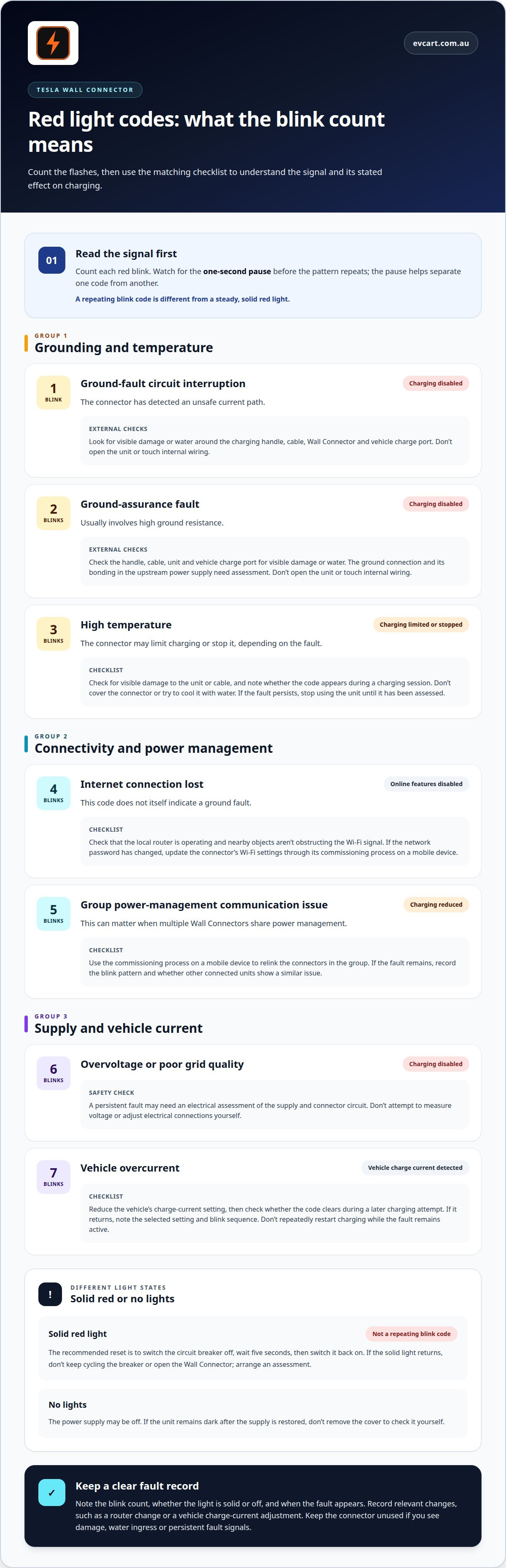
Identify a Tesla Wall Connector red light error by counting the flashes, not by colour alone. Count each red blink, then watch for the one-second pause before the sequence repeats. The pause separates one fault pattern from another and helps distinguish a repeated code from a steady light.
One red blink indicates a ground-fault circuit interruption. The connector has detected an unsafe current path and disables charging. Two red blinks indicate a ground-assurance fault, usually involving high ground resistance. Charging is also disabled for this code.
For either grounding fault, inspect the charging handle, cable, Wall Connector and vehicle charge port for visible damage or water. Don’t open the unit or touch internal wiring. With two blinks, the ground connection and its bonding in the upstream power supply need assessment. If a fault returns after basic external checks, have it assessed by a qualified electrical professional.
Three red blinks signal high temperature. Depending on the fault, the connector may limit charging or stop it. Check for visible damage to the unit or cable, and note whether the code appears during a charging session. Don’t cover the connector or try to cool it with water. If the temperature fault persists, stop using the unit until it has been assessed.
Four red blinks indicate that the Wall Connector has lost its internet connection. Online features are disabled, but this code does not itself indicate a ground fault. Check that the local router is operating and nearby objects aren’t obstructing the Wi-Fi signal. If the network password has changed, update the connector’s Wi-Fi settings through its commissioning process on a mobile device.
Five red blinks indicate a group power-management communication issue, and charging is reduced. This can matter when multiple Wall Connectors share power management. Use the commissioning process on a mobile device to relink the connectors in the group. If the fault remains, record the blink pattern and whether other connected units show a similar issue.
Six red blinks indicate overvoltage or poor grid quality, and charging is disabled. A persistent fault may warrant an electrical assessment of the supply and connector circuit. Don’t attempt to measure voltage or adjust electrical connections yourself. A persistent six-blink code calls for an electrical assessment of the supply and connector circuit.
Seven red blinks mean the Wall Connector has detected vehicle overcurrent. Reduce the vehicle’s charge-current setting, then check whether the code clears during a later charging attempt. If it returns, note the selected current setting and blink sequence. Don’t repeatedly restart charging while the fault remains active.
A solid red light differs from a repeating blink code. The recommended reset is to switch the circuit breaker off, wait five seconds, then switch it back on. If the solid light returns, don’t keep cycling the breaker. Arrange an assessment rather than opening the Wall Connector.
No lights can mean the power supply is off. If the unit remains dark after the supply is restored, an electrician can check for voltage at the terminal block. Never remove the cover to perform this check yourself. Keep the connector unused if you see damage, water ingress or persistent fault signals.
Record the number of blinks, whether the light is solid or off, and when the fault appears. For example, note whether four blinks follow a router change or seven appear after adjusting vehicle charging. These details can help distinguish a network issue from a supply or vehicle-related fault before further troubleshooting.
Across these documented patterns, the blink count identifies the fault and its stated effect. One (1) red blink means a ground-fault circuit interruption to an unsafe current path, with charging disabled; 2 red blinks mean a ground assurance fault with high ground resistance, also with charging disabled. A 3-red-blink high-temperature fault limits or disables charging. In contrast, 4 red blinks mean the internet connection is lost and online features are disabled. A 5-red-blink group power management communication issue reduces charging, while 6 red blinks mean overvoltage or poor grid quality and charging is disabled. These descriptions assign a distinct meaning and stated effect to each of these counts.
EV Cart Australia
EV Cart Australia offers accessories for Australian EV owners. While accessories won’t correct a Wall Connector fault, they can support other parts of your EV routine. Consider what you need for your vehicle and how you use it before choosing an accessory.
Choose EV Cart Australia when you’re looking for accessories for your EV. Consider your vehicle and how you use it before choosing, so the accessory suits your practical needs. Explore EV Cart Australia’s accessories to find options for your ownership routine.
For help choosing an EV accessory, contact EV Cart Australia. You can also explore the accessories available on the EV Cart Australia website.
Keep your next EV decision clear
When planning for everyday EV ownership, focus on accessories that support your regular routine. Consider what would make your vehicle more practical to use, rather than treating an accessory as a fix for a charging issue.
EV Cart Australia offers accessories for Australian EV owners. Think about your vehicle and regular driving needs before choosing an accessory. A clear idea of how you’ll use it helps keep the decision focused on your routine.
For advice about EV accessories, contact EV Cart Australia. Take the next step with a clear idea of what you need, and choose accessories that suit the way you travel.