
Wallbox Pulsar Plus vs Tesla Wall Connector Review
2026-11-14

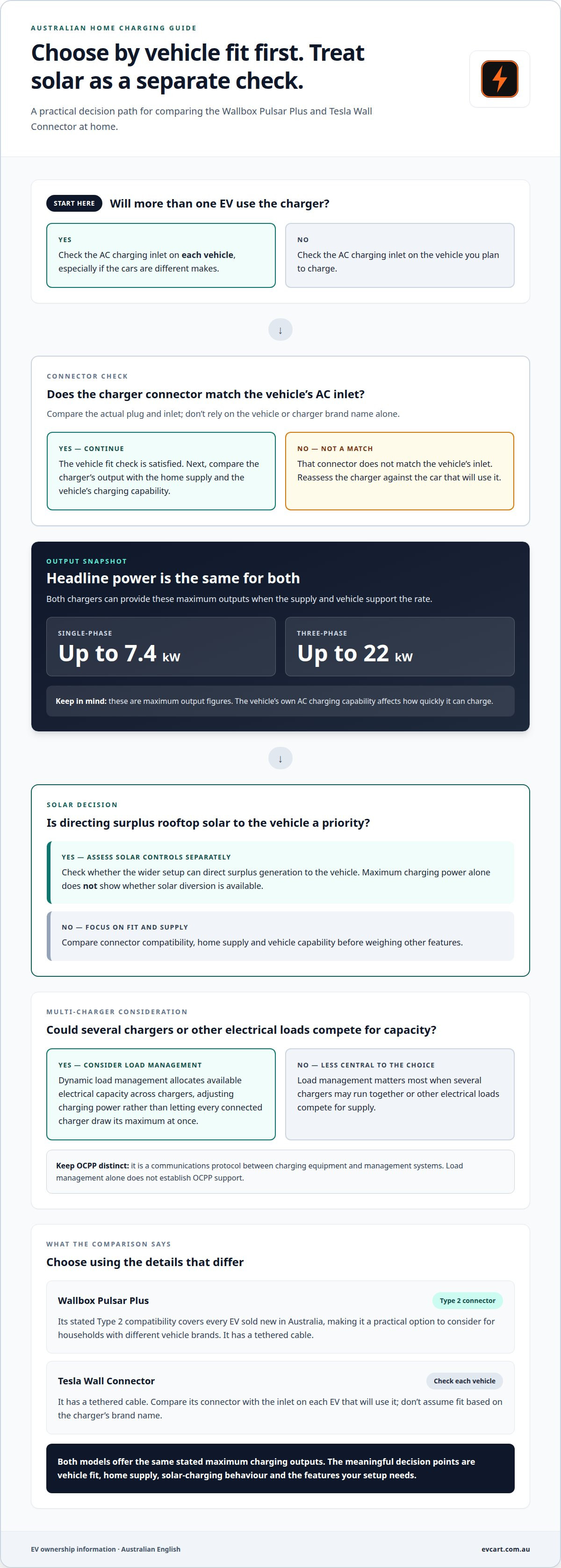
For an Australian home with rooftop solar, the wallbox pulsar plus vs tesla wall connector choice depends on the features you need, not just charging speed. Both can deliver up to 7.4 kW on a single-phase supply or up to 22 kW on three-phase, when the vehicle supports that rate.
It’s sensible to look beyond headline power. Solar charging behaviour, Type 2 compatibility, load management, OCPP support, app controls and energy logging can all affect how well a charger suits your setup.
This comparison outlines the differences between the chargers and what to consider before choosing. Use it to assess how each option fits your vehicle, home electrical supply and rooftop solar setup.
Key Takeaways
- Match the charger’s single- or three-phase charging capacity to your home supply and your vehicle’s capability.
- Both chargers use tethered cables, while Type 2 compatibility helps make the Wallbox a practical option for Australian EVs.
- Consider dynamic load management if you’re planning a multi-charger site, and compare how each charger fits your setup.
- Review app controls, scheduling and energy logging separately; these features can shape how you manage charging day to day.
- Once you’ve chosen a charger, explore EV Cart Australia’s EV accessories for practical ownership needs.
Table of Contents
Which EV charger is best for an Australian home with rooftop solar?
The Wallbox Pulsar Plus vs Tesla Wall Connector choice depends on your vehicle, household supply and solar-charging priorities. Both can deliver up to 7.4 kW on single-phase or 22 kW on three-phase, when the vehicle supports that rate.
Wallbox Pulsar Plus
The Wallbox Pulsar Plus can provide up to 7.4 kW on single-phase or 22 kW on three-phase, subject to the vehicle’s charging capability. Its hardware has a tethered cable, and its stated Type 2 compatibility covers every EV sold new in Australia. That makes it a practical candidate for households considering different vehicle brands.
Those power figures describe maximum output, not how rooftop solar is used. Solar charging depends on whether the wider setup can direct surplus generation to the vehicle. Assess that function separately when comparing chargers.
Tesla Wall Connector
The Tesla Wall Connector also supports up to 7.4 kW on single-phase and 22 kW on three-phase, when the vehicle can accept that output. Its tethered cable avoids carrying a separate lead. A Tesla owner may prefer a charger from the same brand, while a household with another EV should prioritise vehicle fit and charging capability.
In the Wallbox Pulsar Plus vs Tesla Wall Connector comparison, rooftop solar is a separate consideration from maximum charging power. Output alone doesn’t show whether surplus solar can be directed to charging.
Warranty, support and reliability depend on the terms and support arrangements for the specific charger. Maximum charging output alone doesn’t establish a reliability advantage for either model.
For Tesla owners, either charger may suit if its connector matches the car. The Wallbox’s stated compatibility with every EV sold new in Australia is useful for non-Tesla owners. In either case, the vehicle’s own AC charging capability affects how quickly it can charge.
The supplied installation information identifies AS/NZS 3000. For the Tesla Wall Connector circuit, it specifies a Type A RCBO plus a separate 6 mA DC-fault detector, or a Type B RCBO.
Both models have tethered cables and support up to 7.4 kW on single-phase or 22 kW on three-phase. Solar diversion and vehicle capability remain separate considerations from those headline specifications.
Installed costs vary with the hardware and cable-run length. When comparing the complete setup, consider the route from the switchboard to the parking space, as well as any supply or switchboard work.
| Charger | Single-phase output | Three-phase output | Solar and vehicle considerations |
|---|---|---|---|
| Wallbox Pulsar Plus | Up to 7.4 kW | Up to 22 kW | Assess solar-diversion controls and vehicle capability separately |
| Tesla Wall Connector | Up to 7.4 kW | Up to 22 kW | Assess solar controls and vehicle fit separately |
First match the charger to your vehicle and electrical supply. Then weigh up solar controls, installation conditions and the support terms that matter to your household.
Australian Type 2 connector compatibility
For AC charging in Australia, check that the charger cable’s connector matches the vehicle’s charging inlet. If several vehicles will use the charger, compare the fit for each one, especially if they are different makes.
Pulsar Plus Type 2 connection
The Wallbox Pulsar Plus uses a standard Type 2 connector. It is stated to be compatible with every EV sold new in Australia, making its connector a straightforward fit consideration for households with different vehicle brands.
For a specific car, identify its AC charging inlet and compare it with the Type 2 plug. If household vehicles differ, repeat that check for each one rather than assuming compatibility based on the primary car.
Tesla Wall Connector Type 2 connection
For the Tesla Wall Connector, compare its connector with the inlet on each EV that will use it. Tesla and non-Tesla vehicles may have different fit requirements, so assess every intended vehicle rather than relying on the charger’s brand name.
In a mixed-brand household, connector compatibility is a key comparison point. Check each vehicle’s AC charging inlet against the charger cable’s connector before choosing a unit for shared use.
Type 2 is the AC plug used by EVs sold in Australia. That makes the connector a useful starting point, but it doesn’t replace a vehicle-specific fit check. The question is whether the charger’s plug matches the inlet on the car that will be connected.
For example, if your household has a Tesla and an EV from another brand, assess each vehicle separately. Don’t assume a connector suitable for one car will suit the other. Focus on the AC inlet and charging connector, not the vehicle’s brand or the charger’s appearance.
Check fit in three steps: identify each EV that will use the charger, locate its AC charging inlet, then compare the inlet with the charger connector. This is particularly useful when replacing a vehicle or adding another make to the household.
The Wallbox has an explicit Type 2 connector and broad stated compatibility with new EVs sold in Australia. For the Tesla Wall Connector, use the actual vehicle and cable connection as the fit reference. This keeps the decision tied to the cars in your household, rather than assumptions based on brand names.
Dynamic load management and OCPP support
Dynamic load management and OCPP serve different purposes in EV charging. Load management allocates available electrical capacity across chargers. OCPP is a communications protocol between charging equipment and management systems. A Wallbox installation can use load management across a multi-charger site, but that alone doesn’t establish OCPP support.
For a household, load management matters most when several chargers may run at once or other electrical loads compete for supply. It can adjust charging power instead of letting every connected charger draw its maximum at once. At a shared parking area, for example, a site system can distribute available capacity between vehicles as demand changes. This differs from simply choosing a charger with a higher maximum output.
OCPP, or Open Charge Point Protocol, enables communication between chargers and a management platform. It may matter to businesses or property managers choosing equipment for a managed charging network. Don’t treat OCPP and dynamic load management as interchangeable: OCPP support alone doesn’t show how a charger measures site demand or allocates power. Similarly, load management doesn’t establish OCPP compatibility.
The Wallbox Pulsar Plus has stated load-management capability as part of a multi-charger site. This is relevant for shared charging, where several vehicles may connect across a site. The available product information doesn’t establish a specific OCPP capability for the Pulsar Plus, so don’t infer protocol support from its load-management role.
The information here doesn’t establish multi-charger load management or OCPP support for the Tesla Wall Connector. Don’t assume that two Tesla units, or a Tesla unit alongside another charger, will share supply through a particular control system. These functions depend on the charger’s documented features and the wider site setup, not its product name alone.
Use this sequence to compare the two chargers for a multi-unit setup:
- Decide whether the site needs to distribute available supply between multiple active chargers.
- Separate that requirement from platform communications, including OCPP.
- Match the required control method to the charger and management system specifications.
For a single household charger, multi-charger load management may not be a deciding factor. For an apartment building or workplace with multiple charging points, Wallbox’s stated site load-management capability is a specific feature to assess. OCPP is a separate criterion, so compare its documented support rather than inferring it from load management.
App control and scheduling
App control matters if you want to manage charging without using the charger’s physical controls. Compare the Wallbox Pulsar Plus and Tesla Wall Connector app experience separately from charging power. An app’s appearance doesn’t prove that it supports a particular schedule or control.
Start with your household routine. A car parked overnight, for example, has different scheduling needs from one that returns home during the day. Note when the vehicle is usually connected, when it needs to be ready and whether charging times vary during the week. Then compare how each charger’s app handles that routine.
Scheduling can help align charging with a chosen time window, but the charger, vehicle and electricity plan all affect the result. A scheduled start is not the same as solar diversion. If rooftop generation matters, assess solar controls separately rather than assuming a timer will use surplus energy.
Consider what you need to control in the app. Useful comparison points include starting or stopping a session, setting a schedule, changing the charging limit and reviewing the current session. Assess each function separately: a clear display doesn’t show which controls are available for the Wallbox or Tesla setup.
Your electrical circuit also affects your charging routine. App settings can’t change the circuit’s available capacity or the vehicle’s charging limit. A schedule may set a preferred start time, for example, while the vehicle and supply still constrain the charging rate. Keep these roles distinct when comparing the chargers.
Before choosing, write down a typical charging week, including when the car is home and when it needs to be ready. Compare the Wallbox and Tesla app controls with that routine. If your plans often change, prioritise straightforward manual control; if your week is predictable, focus on scheduling.
Also consider who will manage charging. A single-driver household may prefer a simple, repeatable setup. In a two-car household, one person might manage a Tesla while another drives a different EV. Check whether each driver can use the controls they need, and don’t assume one charger’s app manages another brand’s vehicle.
For a fair comparison, separate app usability from confirmed charger functions. List the controls that matter to your routine, such as scheduling or session management, then compare those functions for each model. Choose the Wallbox or Tesla option that suits your daily pattern, vehicle and supply, rather than judging by app design alone.
App integration and energy logging
Energy logging can help you understand how charging fits into household electricity use. Compare the Wallbox Pulsar Plus and Tesla Wall Connector by what each setup records, where the information appears and how useful it is for your decisions.
Start with what is being measured. A charging record might show energy used during a session, while a vehicle display may show battery-related information. These figures can describe different points in the charging process. For example, energy drawn by a charger and energy stored in a vehicle battery aren’t automatically the same.
Next, decide where you want to view charging information. Some drivers prefer one app for charging and vehicle details; others are happy to switch between a charger app, vehicle app and electricity account. A Tesla owner might compare the Wall Connector’s charging information with the Tesla vehicle interface. For another EV, compare the information available in that vehicle’s own app.
App integration also affects how easily you can review a session later. Look for a clear record of the date, charging duration and energy used, if those details are provided. A household that checks weekly use has different needs from a driver who only wants to confirm charging finished before departure.
Rooftop solar adds another distinction. A session’s total energy doesn’t necessarily show how much came from solar generation and how much from the grid. If tracking the source matters, treat a solar-versus-grid breakdown as a separate requirement from basic energy logging. A session total alone can’t identify the energy source.
Use these questions to compare the Wallbox and Tesla setups:
- Can you view charging-session energy in the app or interface you already use?
- Does the record distinguish session energy from vehicle battery information?
- Can you identify charging periods that align with your household routine?
- Does the information show solar and grid contributions separately?
Base your comparison on actual functions, not app appearance. A polished screen doesn’t establish what data is recorded, how it is measured or whether it can be exported. A graph of charging activity may help you spot a pattern, for example, without showing a solar-versus-grid breakdown.
Choose a setup that makes the information useful without adding unnecessary steps. If several EVs are used in your household, prioritise a consistent way to review sessions across drivers. If you mainly track one vehicle, focus on whether its charger and vehicle interfaces provide the records you need. Assess energy logging, solar-source reporting and app integration separately.
EV Cart Australia
EV Cart Australia offers EV accessories for practical ownership needs beyond choosing a home charger. After comparing the Wallbox Pulsar Plus and Tesla Wall Connector, explore accessories suited to your vehicle and day-to-day routine.
Your vehicle and charging routine can help narrow down relevant accessory choices. Check compatibility carefully, especially if your household uses more than one EV model. When you’re ready to explore accessories for your setup, browse EV Cart Australia’s range.
Browse EV Cart Australia’s accessories.
Make the choice fit your charging routine
Make your shortlist practical by considering who will use the charger, where the vehicle will park and how you want to review charging activity. The right fit is the one that suits your vehicle and household routine, not simply the option with the longest feature list.
A careful Wallbox Pulsar Plus versus Tesla Wall Connector comparison can also clarify what matters when choosing accessories for your EV. Keep compatibility in mind as your setup changes, particularly if another vehicle joins the household.
For your next step, shop EV Cart Australia. A considered choice now can make everyday EV ownership simpler.
Frequently Asked Questions
Which is cheaper to install?
Neither charger is consistently cheaper to install across Australian homes. The installed total depends on the hardware, cable-run length and any additional electrical work. A short, direct route from the switchboard to the parking space differs from a longer route around a building. Compare the charger, supply phase, cable route and required switchboard work, rather than judging by the unit alone.
What are the Australian prices of the Wallbox Pulsar Plus and Tesla Wall Connector?
Australian retail prices vary by seller and product configuration, so compare hardware costs separately from installation. A charger listing may cover the unit only, while the full home setup also depends on cable-run length and electrical work. For a fair comparison, check current Australian listings for each exact model and compare what each includes. Don’t rely on an older quoted amount as a current retail price.
What charging speeds and power outputs do both EV chargers support in Australia?
Both chargers can deliver up to 7.4 kW on single-phase supply and up to 22 kW on three-phase supply, when the vehicle supports the rate. The vehicle’s own AC charging limit affects the speed it can accept. For example, a charger’s three-phase capacity won’t make a vehicle charge at that maximum if its onboard charger accepts less power.
Are the Wallbox Pulsar Plus and Tesla Wall Connector compatible with all electric vehicles sold in Australia?
The Wallbox Pulsar Plus uses a standard Type 2 connector and is stated to be compatible with every EV sold new in Australia. Australian EVs use Type 2 for AC charging. Check the vehicle’s inlet against the charger connector, particularly for a mixed-brand household. Connector compatibility is a practical first check, but the vehicle’s charging capability also affects operation.
Which smart charging features and apps do Wallbox Pulsar Plus and Tesla Wall Connector offer?
Compare app controls by the tasks you need to perform, such as setting a schedule, managing a charging session and reviewing energy use. Assess each function separately: an app interface doesn’t establish every feature. If your household wants timed charging, for example, check scheduling; if you want to track consumption, focus on session records. Match the app functions to your routine and vehicle setup.
How do installation requirements and electrician costs compare in Australia?
Installation costs depend on hardware and cable-run length, so the two chargers don’t have one fixed installed-cost difference for every Australian home. Installation information identifies AS/NZS 3000; for the Tesla Wall Connector circuit, it specifies a Type A RCBO with a separate 6 mA DC-fault detector, or a Type B RCBO. Supply and switchboard requirements also shape the work involved.
Can either charger dynamically load-balance with a home's electricity supply or solar system?
Wallbox units can be load managed as part of a multi-charger site, which helps share supply between chargers. That alone doesn’t establish dynamic balancing against a home’s total electricity use or solar output. Load management and solar diversion are separate functions. Compare the controls your setup needs, such as distributing site capacity or directing rooftop generation towards charging.
What cable lengths and connector types do the two chargers have?
Both chargers have tethered cables. Wallbox uses a standard Type 2 connector; check the Tesla Wall Connector’s connector against the vehicle’s inlet.